Is It Time for Your Business Cards to Go Digital?
Are traditional paper business cards becoming obsolete? Have you considered a digital option? The type of card you use and how it looks can say a lot about you and your work. The style of card – from simple embossed text on a white card to ornate colors and fonts – can be a client’s first impression of your work.
You want to use a card that represents your style and works with the kind of clients you work with. When looking for a business card, consider both digital and paper options and integrate your digital self into paper cards. A business card does more than provide your contact information, it is a gateway to your portfolio as well.
1 Million+ Business Cards, Resume Templates and Design Resources With Unlimited Downloads
Download hundreds of stunning business card templates, resume templates, cover letters, and design assets with an Envato Elements membership. It starts at $16 per month, and gives you unlimited access to a growing library of over 2,000,000 design templates, themes, photos, graphics, and more.
Like the article? Be sure to subscribe to our RSS feed and follow us on Twitter to stay up on recent content.
Digital Business Cards
It started with the first-generation iPhone and the Bump application. With a tap, two iPhone users could exchange contact information on the fly without having to hold on to cards or write anything down. Bump is still around today and can be used for more than just contact information but only works between phones (available for iOS and Android), which could be a hindrance when doing business.
Most recently, people are beginning to turn to web-based business “cards.” Sites like About.me, IdentyMe and Flavors.me allow users to create a digital presence using a mix of photos and graphics – use preset choices or upload your own – with links to all of the users’ relevant work. You can connect to Facebook, Twitter, LinkedIn, Instagram, Foursquare, blogs and a host of other sites. With just one link, you can connect clients to all of your relevant information on the web. Because these networks are public, you can share and access your digital business card with a variety of potential clients that you might not have been able to contact otherwise.
A custom site is easy to create and just requires registration. You can change and update your digital card at any time. Make sure to keep your digital profile current and add keywords that describe what you do so your card is picked up in online searches.
Include a link to your digital profile on all outgoing correspondence and embed a custom QR code into your site so that potential clients can add your contact information to their phones and databases in a snap. (A QR, or quick response code, is a customizable barcode that can be used to store information and is readable with smartphones. Think of a QR code as a universal “Bump,” which is universally readable by iPhone, Android and BlackBerry phones.)
Think about what your digital profile says about your work. As a designer, you should look beyond stock images or templates. Use some of your own work as the main image. The design should represent a sample of what you can do for clients.
Try not to go overboard with images and fonts, the main thing you want to accomplish is to provide information so you can pick up clients. Make sure phone numbers and addresses are clearly visible as well as links to related work.
Pros
The best part about going the digital route is that everything is connected. Instead of listing a host of links on the back of a business card, you need just one link that can send people to different parts of your portfolio. You can update your profile as often as you like and don’t have to send out new links when you update the site or your contact information.
Going the digital route also helps keep your costs down. The “cards” are fully customizable and free on most sites. Shop around to find the site that works best for you, because some do charge to house your digital account. Access to some premium features, such as mobile layouts and custom domain names, come with an annual fee on some sites.
Most digital cards allow an almost unlimited number of options to showcase your portfolio. You can post video, flash images and photos in addition to links and text. You don’t have to worry about running out of space in the same way you do on a 2 inch by 3.5 inch card.
Cons
Some clients may not quite be on board with the digital trend and prefer paper products and you won’t have anything to hand out when you meet people in person. Evaluate your client base and their needs before ditching paper cards altogether. Links can sometimes be hard to remember and may get lost if you jot them down on paper.
Also think about the way you use business cards. Do you post them on billboards to drum up business? Or pass out hoards of cards at conferences or business meetings? Going digital may not be the best option if your cards are used this way.
Traditional Business Cards with Digital Elements
For most designers, the easiest link between digital and traditional business cards is something of a meshed version. While making the full-scale digital transition, think about printing a few paper business cards with a digital touch.
Create a QR code – try a free service such as JumpScan, BeQRious or QuickQR – and download your personalized QR image. Then just add the image to each of your business cards when you have them printed. If you already have a stack of cards and want to add a code, consider adding printed stick-on labels to the back of your cards.
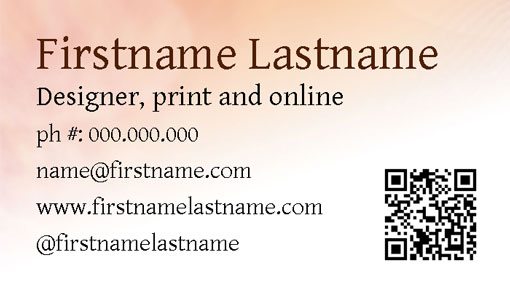
Create a digital business card and embed that link in the QR code printed on your paper cards. Having both types of cards can help you expand your business reach and will allow those paper clients to get a taste of your digital products. When designing your paper and digital cards, consider creating a visual link between the two. Use the same image, fonts and color scheme to create a brand identity.
Passing out a business card has an element of traditional classiness and can say a lot about the person handing it out. The quality of printing, use of typography and color can serve as a lasting impression about your style of design. Make sure your cards have personality. Shoot for a special paper or color with a lot of pop and have them printed professionally.
Pros
Some people just like the feel of a card. They are easy to save and identify. Cards that are blank on the back are great for scribbling a little extra nugget of information for clients, such as a price quote. Having a card to hand out can make you look more professional and lend a little extra credibility to a new business.
You get the traditional look and feel of paper business cards with your portfolio attached. When you hand out cards, people can scan the code and toss the card without losing track of your information. You can also show a client your work on the fly with a quick scan of the code. Creating a code only takes a few minutes and can be done for free. Use a QR code generation site that allows you to update your code as well, so you can add links and keep your digital profile up-to-date.
Cons
Nice business cards can be expensive to print and need to be reprinted if contact information changes. Cards can also be lost or thrown away. For some, using a paper card just does not work with the type of business being done in the digital marketplace. If you include links on a card, they need to be short (or sassy) enough that they are easy to remember and type. Cards also offer a limited amount of space to make an impression, and don’t always allow designers to showcase the full scope of their work.
Not all of your clients may understand QR codes and you may have to explain what the code is and how it works.
Information to Share (and Avoid)
A digital business card allows you an unlimited space to promote yourself, but make sure to limit what you publish online. Try not to overwhelm potential clients with too many project links. Use your digital business card to promote your best work and not everything you ever created.
Always make sure your contact information is clearly stated. Remember that some people who check out your digital business card will still want to visit you or pick up the phone as well as send you an email.
Create space between your personal and professional selves. Do you use Facebook and Twitter for business? Include those links. If your accounts are strictly personal, don’t include them in your professional online profile. Make sure to use only links for sites that you monitor regularly. If you only log in to Facebook once a year, don’t bother adding it to your profile.
Digital Cards with Pop
Represent Your Work
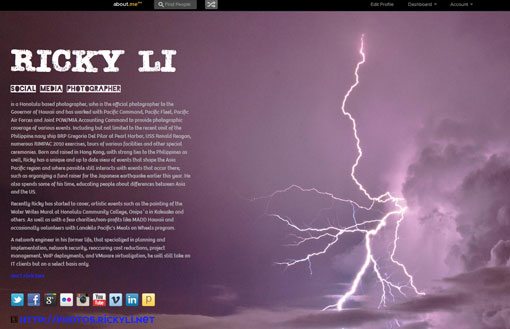
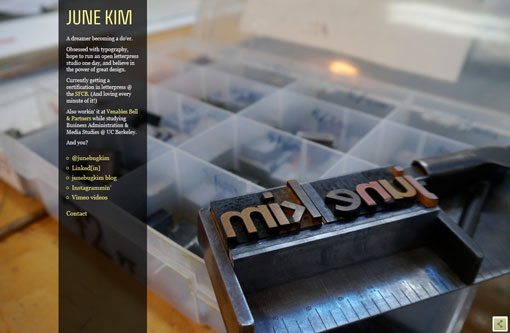
Nothing sells your work better than showing off good work. Photographer Ricky Li does just that with his card. Using a striking and colorful photo, Li shows the kind of work he produces and provides a link to more if his photography. June Kim uses a super interesting image that represents Kim’s work and incorporates her name into the image. He resume opens with just a click and you contact information is clearly visible.
Use Your Face and Type
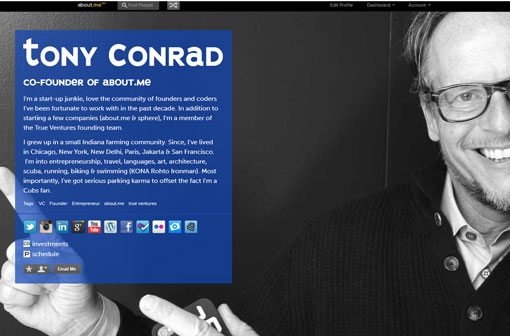
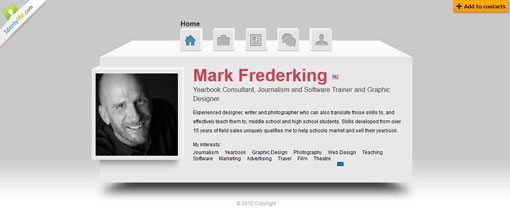
Tony Conrad, co-founder of about.me, uses his photo to sell himself and here it works. The photo is striking and makes you look twice, especially with the contrast of the start black and white photo with the blue text box. Mark Frederking took a similar approach with his card, using his face on a plain, but clean, background. Both cards use strong text choices – an interesting font for Conrad and a color that pops for Frederking – to pull you in.
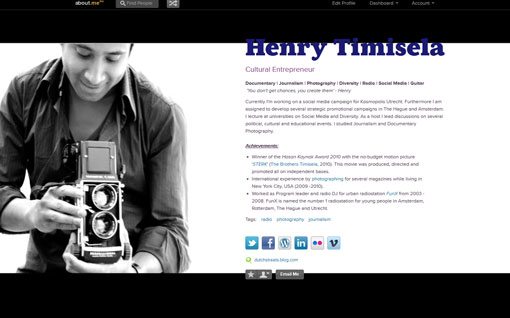
The most striking use of a self-portrait and type is from Henry Timisela (shown near the beginning of this article). From the image you know what he does, and his achievements are stated with links to his work. The card uses a clean, crisp style which you might associate with his work.
Conclusion
Digital business cards may be the next big thing and can help your promote your work to a client base that you have yet to meet. Going the digital route allows you to showcase more of your work and can be inexpensive, but it might not always work for your client base.
Consider using both paper and digital business cards to get your name out. This will allow clients who meet you face-to-face to take a little reminder of you with them and hopefully do online to learn more about your work. Remember, both types of cards can be a lasting impression of you and your work so make sure they represent you well.
Image Sources: Murat Erturk, and jaaron.