Four Quick and Easy Ways to Embed MP3 Files Into Your Site
Once upon a time I was in a rock band. When I was building our website, I naturally wanted to put some music up so visitors could listen before purchasing our songs on iTunes. After a bit of research I found out that there are a million ways you could go about it, some better than others. Sadly, after two albums and lots of good times, my band The Van Buren Regulars no longer exists. Fortunately, what I learned about embedding music lives on and is easy enough to pass along.
Today we’re going to look at four easy ways to embed MP3 files into your website. All of these methods are free and take mere minutes to implement. Let’s check them out!
Simple Player with Editable Parameters
Using an object tag, we can create our own little player with a few lines of code. Paste the code below into your page and insert the link to your MP3. Then you can customize options like height, width, background color, loop, and autoplay.
Source: O’Reilly Media
<object width="300" height="42">
<param name="src" value="LINKHERE">
<param name="autoplay" value="false">
<param name="controller" value="true">
<param name="bgcolor" value="#FFFFFF">
<embed src="LINKHERE" autostart="false" loop="false" width="300" height="42"
controller="true" bgcolor="#FFFFFF"></embed>
</object>
Here’s the player that results (may take a minute to load):
Google Reader MP3 Player
I’m sure you wouldn’t be surprised to know that Google has a free resource that suits this problem perfectly. To use the Google Reader MP3 player, simply paste the following code into your page and point the “audioURL” at your MP3 file.
<embed type="application/x-shockwave-flash"
src="http://www.google.com/reader/ui/3247397568-audio-player.swf?
audioUrl=http://LINK" width="400" height="27"
allowscriptaccess="never" quality="best" bgcolor="#ffffff"
wmode="window" flashvars="playerMode=embedded" />
Here’s a sample:
Yahoo Media Player
The Yahoo Media Player takes a drastically different approach by presenting viewers with a very minimal piece of text and a play button instead of a full-fledged player. However, when you click the play button, a floating player pops up that stays with you as you scroll. Pretty snazzy!
For the Yahoo player, you first insert this piece of JavaScript into you code:
<script type="text/javascript" src="http://mediaplayer.yahoo.com/js"></script>
Then, instead of creating a new player for every MP3 you want to embed, you simply link to the MP3s in your HTML and it automatically creates the player for you.
<a href="LINK.mp3">Song 1</a>
<a href="LINK.mp3">Song 2</a>
Here’s the example:
Song 1
Song 2
Also note that even before you click the play button, the Yahoo player is docked and ready to go at the bottom left of the window. Just click on the arrow to slide it out.
MixPod
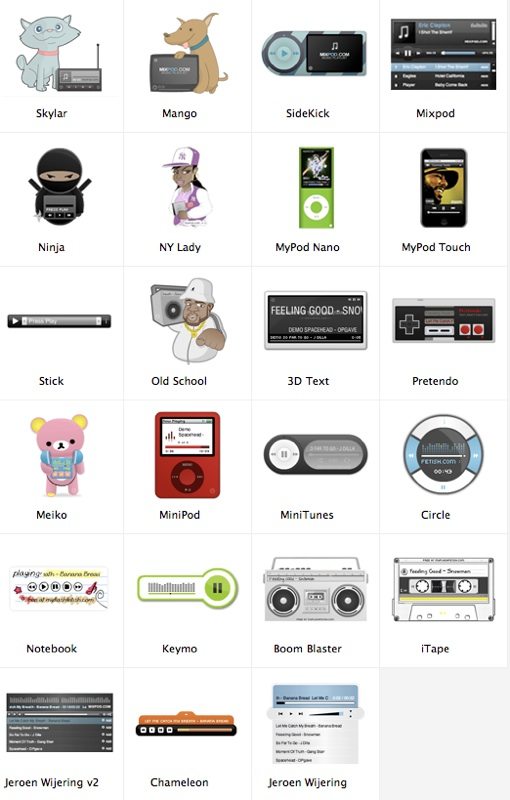
MixPod creates a free flash widget to embed into your site. There are pros and cons to using this service compared to those above. The cons are that you have to sign up (free) and the player displays a link to MixPod. The pros are that you get a plethora of great design options, embedded song information including artist and song name, the ability to adjust the color scheme to match that of your site, and access to popular songs and playlists.
Setting up a MixPod is super easy and requires no knowledge of coding beyond where to paste the snippet of code they give you. All you do is paste in your MP3 link, insert the artist/track info for all the songs in your playlist, and choose your skin and colors. Then MixPod provides you with a rather large chuck of code to paste into your site. The result is pretty slick.


Here’s a shot of the other skins you can use:
MixPod is just one of many providers of free flash players you can embed into your site. Check out this post over at CNET for list of good ones.
Conclusion
This post is a little on the short side but that’s because embedding music has really become super easy. All of the players above offer you simple, copy and paste solutions to putting MP3s on your site. The player you should go with depends entirely upon the way you want to use it. Sometimes you just want something as minimal as possible while other times you want a flashy, animated player your viewers can’t miss. Personally, I love the skins and functionality available on the MixPod players. However, only the Yahoo offers that great floating feature so the player stays with you and can be turned off or manipulated at any time. leave a comment below to let us know how you embed MP3s into your sites or which of these options you like best.