Introduction to CSS3 – Part 3: Text Effects
The third part in this series on CSS3 will be delving into the new text effects. Typography is, without any doubt, one of the most important aspects to get right when designing a layout. Type can draw the reader through a page, give a certain impression, provide impact, be subtle, or aid in separating content.
CSS is already reasonably versatile in the way in which text can be displayed, but still constricts design in quite a few areas. CSS3 goes some way towards removing those limitations.
All the examples shown below can be seen at our CSS3 examples page. Many, however, can only be appreciated in the latest builds of various browsers:
Text Shadow
Text shadows sound a little tacky, but it all depends how they are executed. When experimenting for this article I found some combinations to look terrible, and some to give an attractive, subtle effect. Shadows could definitely be put to good use in headings and titles – there are some great examples of their use at Matthias Kretschmann’s blog.
.text_shadow {
color: #897048;
background-color: #fff;
text-shadow: 2px 2px 2px #ddccb5;
font-size: 15px;
}

Word Wrapping
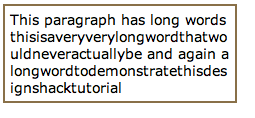
At present, if a word is too long to fit within one line of an area, it expands outside. This isn’t a very common occurrence, but does crop up from time to time. The new word wrapping ability allows you to force the text to wrap – even if it means splitting it mid-word. The code is incredibly straight forward:
.text_wrap {
word-wrap:  break-word;
}
Web Fonts
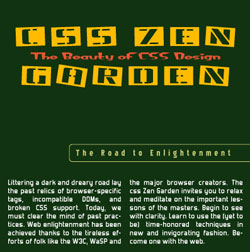
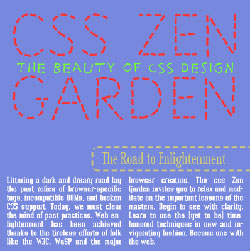
Whilst these are not classed as a ‘text effect’, we are going to cover them here briefly. A Web Font is simply a way to use any font in your page, being downloaded automatically by the browser. This will be a revolutionary change to web design, which previously has been limited to 10-15 widely supported fonts. However, this new feature brings bring copyright into debate as only properly licensed fonts should be used.
Currently, the latest version of Safari (3.1) is the only browser supporting Web Fonts. Opera is suggested to be another which will soon be enabling support, and the others will no doubt follow at some point in the future. An example of how this could be achieved would be:
@font-face {
font-family: 'Name of the new font';
src: url('https://designshack.net/fonts/font.ttf');
}
A few examples of pages have been mocked up using this technique. The following are examples in the vein of CSS Zen Garden, created by A List Apart. The linked versions will only work on certain browsers:
In conclusion…
Many of the missing features of CSS2 have been rectified in this update. This article doesn’t cover all the additions in terms of text – if you’re interested, you can read more about the text module. All these additions are great when used in a subtle way, enhancing the typographic layout of the page.
The next article in this series will be expanding on some of the user interface enhancements in CSS3. Remember, to see live examples of these features, take a look at our CSS3 example page.