Search Forms in Safari
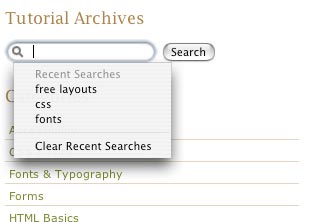 It is remarkably simple to put this design feature in place on your site, and it can improve functionality greatly for those using a Mac. Whether Firefox and Internet Explorer will integrate this feature into their browsers in the future is unknown – although it is fairly unlikely.
How to turn the feature on
Using the following code for a form will cause the enhanced search field to display in Safari:
<form action="form.php" method="post">
<input type="search" name="search"
autosave="mysite-autosave" results="10" />
<input type="submit" value="Search" />
</form>
The type="search" tells safari to use the field as a search box, and the autosave="mysite-autosave" results="10" sets additional features about the recent search information.
The downsides
The negative aspect of adding this feature is that your code won’t validate. It’s up to you to decide whether it is a acceptable down-side of improving the browsing experience for those using Safari. We think it is – and you’ll see the enhanced search field on Design Shack!