Introduction to CSS3 – Part 4: User Interface
This tutorial will be taking a look at some of the new ways you can manipulate user interface features in CSS3. But what do we mean by “user interface”?
CSS3 brings some great new properties relating to resizing elements, cursors, outlining, box layout and more. We’re focusing on three of the most significant user interface enhancements in this tutorial.
The examples shown below can be seen at our CSS3 examples page. Many, however, can only be appreciated in the latest builds of various browsers:
Resizing
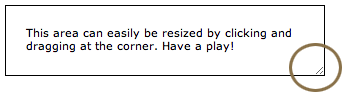
The latest version of Safari has a feature which allows resizable text areas. This is a great addition and one I find myself using daily. CSS3 allows you to easily apply this to any element, eventually to become cross-browser compatible. The code is the resize:both; line:
.ui_resizable {
padding: 20px;
border: 1px solid;
resize: both;
overflow: auto;
}
Box Sizing
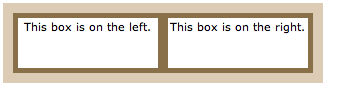
The ‘box model’ CSS3 module is one of the more extensive areas, and full information can be found at the official specification. The box sizing aspect allows you to define certain elements to fit an area in a certain way. For example, if you’d like two bordered boxes side by side, it can be achieved through setting box-sizing to ‘border-box’. This forces the browser to render the box with the specified width and height, and place the border and padding inside the box.
At present, additional prefixes are required to support this in all browsers – you can see the full list on the example page’s code. Here’s a basic possibility:
.area {
width: 300px;
border: 10px solid #ddccb5;
height: 60px;
}
.boxes {
box-sizing: border-box;
width:50%;
height: 60px;
text-align: center;
border: 5px solid #897048;
padding: 2px;
float:left;
}
Outline
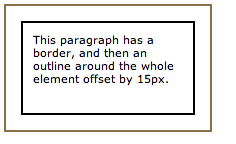
Setting an element outline is already available in CSS2, but in CSS3 includes the facility to offset the outline away from the element – by a value you define. It differs from a border in two ways:
- Outlines do not take up space
- Outlines may be non-rectangular
They can be created as follows:
.ui_outline {
width: 150px;
padding: 10px;
height: 70px;
border: 2px solid black;
outline: 2px solid #897048;
outline-offset: 15px;
}
In conclusion…
These features aren’t revolutionary, and are not likely to cause a stir in the design community. It can’t be denied that they’re useful – in particular giving the reader the ability to resize elements.
The next article in this series will be looking more in-depth at one much more revolutionary feature of CSS3 – multi column text. Remember, to see live examples of these features, take a look at our CSS3 example page.