Search Results For: effect

Graphics / 28 Sep 2010

6 Tips for Designing With Lines

Today we’re going to look at one of the simplest possible design elements: a line. We’ll learn how to wield lines properly as well as what to avoid when implementing them.

Adding a few simple lines to a design can bring structure and graphical flair to an otherwise boring design. It’s a dead simple trick that, when used effectively, has the effect of adding a layer of finish your design.
Graphics / 24 Sep 2010

How to Make Your Spreadsheets Less Lame

Spreadsheets are lame. There’s no two ways about it. We designers hate spreadsheets because they’re a shining example of boring data presented in a boring manner.

Unfortunately for designers, spreadsheets are a necessary evil and could even be called a great and essential tool in the business world. Today we’re going to see how to improve both the aesthetics and readability of your spreadsheets with a few super basic design principles that literally anyone can follow. Let’s get started!

Graphics / 16 Sep 2010

Create Awesome Animations in Photoshop

After Effects is the go-to Adobe application for creating both simple and complex animations. However, for those users that either don’t have the time to learn an entire new application or simply don’t own a copy of After Effects, Photoshop has incorporated very similar, albeit scaled back, functionality.

Today we’ll go over the basics of how animation works in Photoshop and then build a basic animation from scratch. Let’s get started!

Designing a Professional Business Card

Business Card Templates / 14 Sep 2010

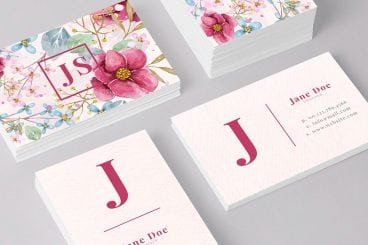
Designing a Professional Business Card

Before websites, email blasts and banner ads, business cards were the central piece of design work for countless small businesses. This simple little piece of cardstock was a major representation of your company. In China, business cards are so highly regarded that it’s considered poor etiquette to write on someone’s card or even put it in your wallet! Typically upon exchange business cards will be placed into a small card case.

Though the digital age has dawned, business cards remain a fairly popular way to quickly provide someone with information about how to reach you or find out more information about your company. Today we’ll go over some common mistakes in business card design and explore a few practical techniques you can use to bring style and professionalism to your cards.

10 Tips for Designing Presentations That Don’t Suck

Keynote Templates / 3 Sep 2010

10 Tips for Designing Presentations That Don’t Suck

PowerPoint has produced more bad design in its day that perhaps any other digital tool in history with the possible exception of Microsoft paint.

In this post we’re going to address the epidemic of bad presentation design with ten super practical tips for designer better looking and more professional presentations. Along the way we’ll see a number of awesome slide designs from Note & Point along with some custom examples built by yours truly. Let’s get started!

JavaScript / 31 Aug 2010

Build an iPad-Themed Image Slider With jQuery

If you’re not a seasoned web developer, it can be quite intimidating to approach a project where your client is looking for something trendy and interactive such as an Apple-centric slideshow.

Today we’ll teach you how you can create just such a project in mere minutes using some awesome free resources from around the web. We’ll walk you through ten super simple steps so even if you have little to no web experience, this project should be a breeze!

Navigation / 26 Aug 2010

Create a Fun Animated Navigation Menu With Pure CSS

In recent years jQuery has become the easiest and best supported way to implement simple animations online. JavaScript is exceptionally good at what it does and this article is in no way an argument against it.

However, CSS3 offers a glimpse into a possible future where basic animations are performed with straight CSS completely independent of scripting. Today we’ll take a look at how to use CSS3 to create a fun and unique navigation menu that uses @font-face, transforms and transitions.

Graphics / 20 Aug 2010

A Practical Guide to Designing With Faces

One of the principal functions of professional design, if not the central function, is to draw the attention of the viewer. Everyone has a message that they want to get across, but getting people to actually stop and take that message in is no easy task.

Designers are therefore tasked with attempting to use every human’s natural attraction to aesthetic beauty in such a way that it becomes possible to capture the attention of an audience almost without them even realizing it.

With this goal in mind, faces are a magic design element.

Accessibility / 28 Jul 2010

Tips for Designing for Colorblind Users

It’s estimated that about 8% of males and 0.5% of females are born colorblind. That may seem like a low number but if you’re designing for a large audience, having a site that’s unusable for eight out of every hundred males is definitely less than desirable.

Fortunately, you can fairly easily make sure that your site is colorblind friendly by always keeping in mind the information below. We’ll take a look at what colorblindness really means and how you can tweak your designs based on a few simple principles.

Graphics / 23 Jul 2010

50 Fantastically Clever Logos

I know everybody and their brother does logo roundups so you’re probably sick of them, but I don’t believe I’ve ever done one and there is a particularly impressive brand of logo design that I wanted to point out.

Today we’ll look at 50 logos that are the result of going beyond the typical thought process and injecting a little wit and hidden symbolism into the design process.

Graphics / 2 Jun 2010

Create Stunning 3D Text Free With SketchUp

Everyone loves 3D text.

Unfortunately, not everyone can afford the 3D modeling software necessary to build it. Today I’ll teach you how to create some awesome 3D text using only Photoshop and a free app from Google. Intrigued? Read on!

JavaScript / 27 May 2010

Create an Awesome 3D Slideshow With Cu3er: Part 1

Today we’re going to build a simple web page with an amazing and free tool: Cu3er.

Cu3er is a really neat 3D image slider with crazy visual transitions and lots of customization options. Though it’s built with Flash and JavaScript, you don’t really need to know either of these to use it.

In this article, we’ll get the page built and the slideshow up and running. Next time we’ll return and see how to customize some of Cu3er’s many features and variables.